2D, 3D and AR planning
Design in 2D with multi-selection, snapping, measurements, saved construction dimensions and clipboard tools; inspect the stage in 3D and preview it at 1:1 scale with Android AR.
IPSC course-of-fire planning
Create IPSC stages in the browser, place walls, fault lines, targets, barriers and obstacles, check the design against selectable rule profiles, and export the finished course.
Design in 2D with multi-selection, snapping, measurements, saved construction dimensions and clipboard tools; inspect the stage in 3D and preview it at 1:1 scale with Android AR.
Run deterministic plausibility checks for the selected IPSC discipline, region and match level.
Keep stages online or offline, review equipment checklists, build and check matches, collaborate in workspaces and export JSON, PDFs, PNG diagrams or complete ZIP match packages.
From first sketch to matchbook
The drawing is not isolated from the briefing: geometry, targets, activators, checks and exports all use the same stage data.
Walls with openings, Fault Lines, multi-selection, paper targets with hard cover, plates, poppers, bullet traps and configurable props.
Moving targets, A-numbered activators, activator poppers and G-numbered doors or barrier arms with explicit activation links.
Dedicated 3D geometry and Android AR help assess height, arrangement and the stage at real-world scale.
Selectable international and regional profiles flag modelled rule conflicts, steel distances, course limits and construction concerns.
Personal folders, native offline copies, synchronization, version history and shared Club workspaces with roles.
Build ordered matches and produce stage briefing, setup and matchbook PDFs, PNG diagrams and portable JSON.
Try it yourself
These diagrams are generated from real sample stage JSON files included with the browser application. Download a sample and import it after signing in.
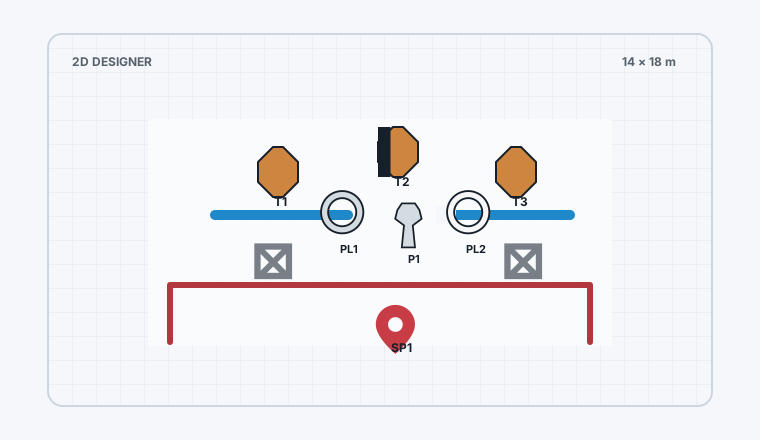
Walls, a port, Fault Lines, paper targets with hard cover, steel/plastic plates, a popper and common props.
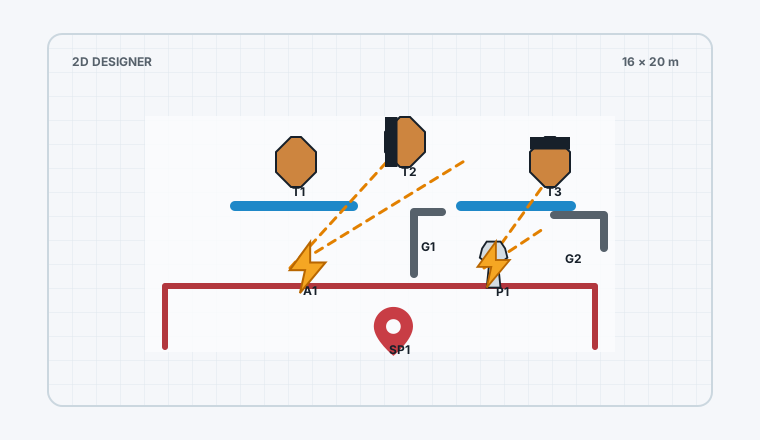
Download example JSONA1 triggers a swinger and operates door G1; popper P1 is marked as an activator and operates barrier arm G2.
Download example JSONAn intentionally problematic stage with nearby steel, a manual gate and German-restricted props. Import it and run Germany / Level 2.
Download example JSONPrepared tier structure
The values below are read from the active server plan configuration whenever possible, so administrator changes are reflected here.
Plan enforcement is currently disabled during testing. The tier structure is visible now, but account limits are not yet enforced by default.
Documentation
Open the user menu and choose User manual. It covers editor controls and construction dimensions, targets, activators, barriers, 3D/AR, Stage Check, equipment checklists, libraries, workspaces, Match Builder, exports, account security and plans.